


What is Leica Cyclone 3DR?
Leica Cyclone 3DR is a desktop software application for working with 3D laser scan data. It is purpose-built for reality-capture workflows and allows you to:
- Import and clean point clouds
- Align (register) multiple scans
- Create meshes and extract geometric features
- Perform inspection, measurement and reporting
- Prepare data for BIM, CAD, surveying and visualisation
Unlike general 3D modelling programs, Cyclone 3DR is optimised for real-world measurement accuracy, making it a preferred tool for engineering, surveying, architecture, and digital fabrication.
(See Basics of the Software on pages 5–19 for foundational interaction features.)

How can I access Leica Cyclone 3DR?
Cyclone 3DR is available on uCreate Makerspace LiDAR laptops only as to run the software, the computer must have a valid Leica Geosystems licence.
This means you will not be able to run Leica Cyclone 3DR on your own machine.
A laptop is included in your package when you book out the LiDAR scanner on our loans site, SISO.
Interface overview.
Cyclone 3DR’s interface consists of several key panels.
Menu Bar
- Create/open/save projects
- Import/export point clouds
- Access help and general settings
Toolbar
- Displays tools relevant to your current task—cleaning, meshing, registration, analysis, etc.
- Dynamically updates depending on selected object or workflow
Tree Panel (Left)
- Hierarchical view of all clouds, meshes, polylines, geometries and folders
- Bulb icon toggles object visibility
- Shows object type via dedicated icons
3D Viewport (Centre)
- Main workspace for viewing and manipulating data
- Supports perspective & orthographic modes
- Allows multiple split views (up to 8) for simultaneous analysis
Properties Panel (Right)
- Shows parameters, statistics and metadata for the selected object
- Used frequently when inspecting meshes, point clouds, or alignment results
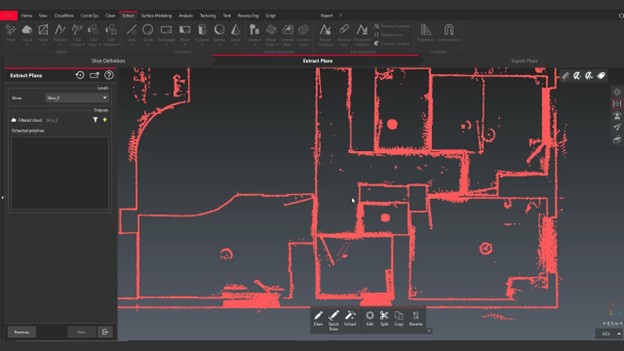
Basic Navigation.
Cyclone 3DR uses picking points for rotation. This means that the point under the mouse becomes the rotation centre.
| Action | Control |
|---|---|
| Rotate view | Left click + drag |
| Pan view | Right click + drag |
| Zoom | Scroll wheel |
| Toggle perspective/orthographic | Press O |
| Orbit modes | R (perspective), O (orthographic), P (panorama) |
Working in Leica Cyclone 3DR.
Importing Point Clouds.
1. Go to File > Import
2. Add files or drag-and-drop.
Cyclone 3DR supports the file formats: .e57, .asc, .ptx, .las, .lgsx.
3. Choose preprocessing options (units, scaling, intensity import, etc.)
Merging clouds is possible via Merge Clouds.