What is Inkscape?
Inkscape is a free to use vector graphics editor (similar to Adobe Illustrator). Vector drawing facilitates the creation of extremely high quality images, with little pixelation and very small file sizes.
Our primary use of Inkscape in the makerspace is to create files for laser cutting or CNC milling. It can also be used for digital art.
The main file format is a Scalable Vector Graphic (SVG), but it supports opening or importing many different formats. For example, SVG, SVGZ (gzipped SVG), PDF, EPS, and AI (Adobe Illustrator) formats. It can also import most raster formats (JPEG, PNG, GIF, etc.) as bitmap images, but it can only export PNG bitmaps.
See below for more information about file formats.

How can I access Inkscape?
You are able to download Inkscape directly from the Inkscape website onto your own computer.
Getting Inkscape on Mac OS is a little more complicated than with other applications. Since there is no version of Inkscape capable of running directly on a Mac OS, you need to install and run a software called XQuartz which allows you to run certain cross-platform applications.
The program connects applications to Quartz, which is the OS X graphics framework that creates the display on a Mac computer screen. A video explaining the whole process can be found here. See here for a written guide on how to install Inkscape for Mac.
Inkscape is also downloaded on all of the makerspace computers.
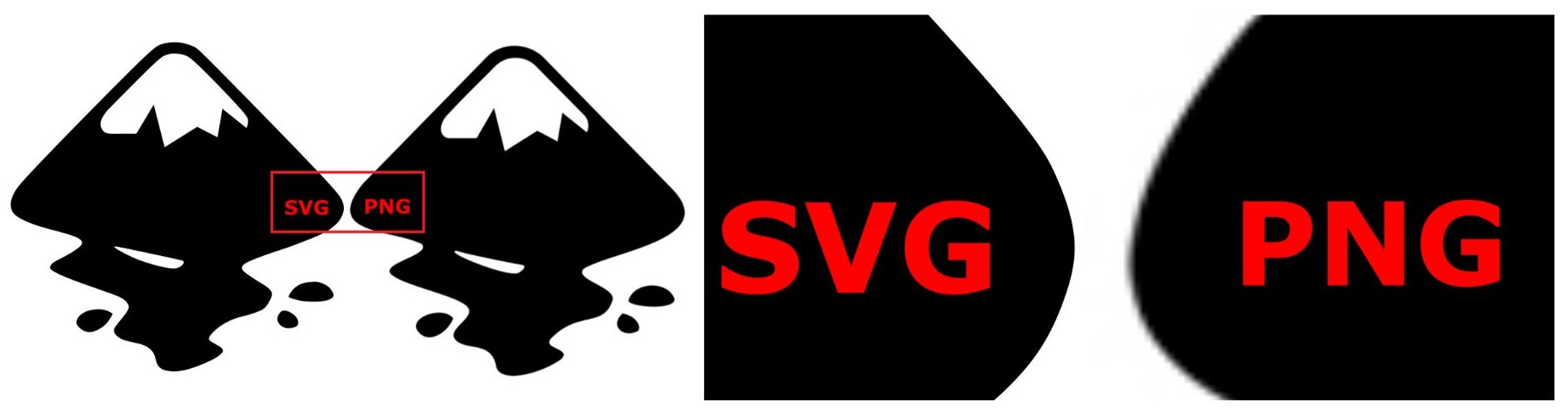
Inkscapes main file format - SVG.
The main file format is a Scalable Vector Graphic (SVG). SVG is a text based image format and uses mathematical structures to represent a image and is highly scalable.
This is different to other widely used image formats, like PNG and JPEG. A PNG is a binary image format and represents image as pixels. A JPEG is a raster image format and is mainly used in photography applications.
Essentially, while an image may look clear and crisp, if you zoom in on it or scale it up and it is a PNG or JPEG it will become blurry, whereas an SVG will stay looking perfect.
Where can I find more information on how to use Inkscape?
For uCreate guidance on how to use Inkscape, please see the other content in our multimedia knowledge base or our recorded software workshop.
Inkscape also has an active community (with plenty of premade artwork you can get hold of) and a plethora of other learning resources available: