

What is Laser Cutting?
Laser Cutting is a type of 'subtractive manufacture' which means that it takes away from a starting material to create a finished product.
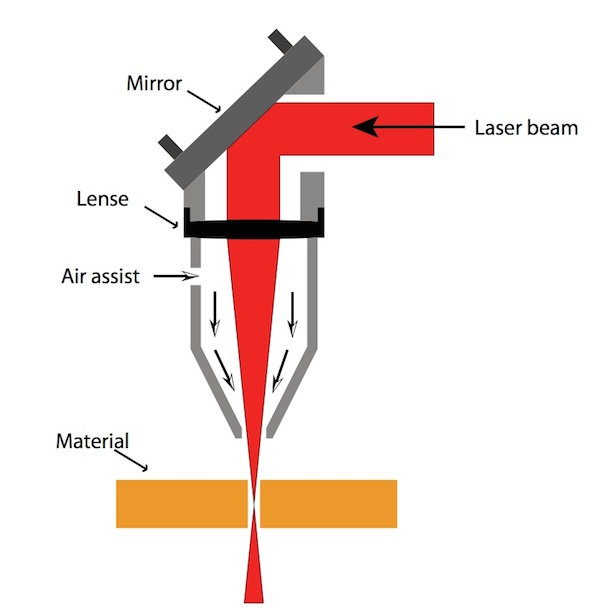
More specifically, a high powered laser beam is focussed onto the material from above to either cut all the way through the material (known as a vector cut) or to only partially cut through the material in order to create a visible pattern (known as a vector or raster engraving).

How does a CO2 laser work?
At uCreate, we have a CO2 laser cutter. The Epilog Fusion Edge 24 - CO2 Laser Cutter.
A CO2 laser machine relies on a high-pressure, gas-filled tube with mirrors at each end. These mirrors reflect the light generated by the energised CO2, back and forth, amplifying the beam of light. When the light reaches the desired intensity level, it is directed onto your chosen material.
Health and Safety.
The laser cutter is a safe machine, when used properly. It becomes dangerous when it is misused.
The Laser cutter operates with a high-powered laser that can instantly blind or catch fire if used inappropriately. You must always follow all instructions for use when operating the machine.
Increasing power, reducing speed, unfocused beam, double lines on files are all causes of fire.
If you are unsure when using the machine, or anything goes wrong, speak to a member of staff immediately.

-
The laser can only be used by users who have completed the mandatory laser cutter training, have the laser booked and had their laser cutter request form approved. You can book the laser cutter training here.
-
A member of uCreate staff must always be in the room while the laser is running. If they must leave, you will be asked to pause your cut until they return.
-
Only used approved materials. Not all materials are laser safe (see here for materials guidance).
-
Never stack materials in the laser. Stacking materials is a fire risk as it traps air between the materials.
-
Never change laser settings without consulting a staff member. All of the material settings saved on the laser cutter have been tested by staff to ensure they are safe.
-
Never lift the lid of the laser while it is running. Lifting the lid of the laser while it is running puts the user and others at risk of a laser eye strike.
-
Never turn off the extraction or air compressor. The extraction and air compressor stop the laser from overheating and reduces the risk of fire.
-
If you observe fire in the laser, immediately pause the cut and inform a member of staff.
-
If something does not cut on the first pass, do not send it to cut again. Speak to a member of staff. Cutting the same piece multiple times is a fire risk.
Laser cutter stop buttons.
The laser cutter has a play/pause button and an emergency stop.
The play/pause button is used to start and pause your cut. For example, if you need to check something with a member of staff before continuing your cut or if the uCreate staff member overseeing the laser has to leave the room.
If you need to cancel a cut, after pausing, this can be done on the laser screen.
The physical emergency stop is a last resort.
The extraction will only turn off if the emergency stop is pushed. Keeping the extraction on can be very useful, this is why the physical emergency stop is a last resort.
If anything goes wrong or you are unsure, always pause the laser and ask a member of staff.

What could I use laser cutting for?
- Cutting any 2D shapes out of thin sheets of laser safe material. Not all materials are laser safe, see materials page or ask a member if staff for more information.
- Engraving patterns, words or designs onto existing objects.
- Cutting and engraving a piece of material to create a custom sign or picture.
- Photo realistic engravings.
- Cutting 2D shapes to assemble into 3D objects.
A slot together box is a great first laser cutter project to learn about constructing 3D objects from 2D pieces!
Take a look at these websites for auto generating slot together boxes!
https://boxes.hackerspace-bamberg.de/
See more information on how to use laser cutting to make 3D objects here.


When should I not use laser cutting?
You should seek an alternative subtractive manufacture method when:
- You want to cut thick materials - Laser cutting only works well cutting thin material as by the time the laser has cut all the way to the bottom of a thick piece of material, the top surface of the material will have been exposed to the laser for a long time and become burned or melted - as an alternative try CNC Milling.
- You want to cut or engrave material that is not laser safe - Only certain materials are safe when exposed to the very high temperatures of the laser cutter. Non-laser safe materials may produce poisonous gases in this situation - as an alternative try CNC milling or Vinyl Cutting.
- You want to create an object with 3D dimensions e.g. a slant or bevel - For our equipment at least, laser cutting is a 2D process. It cannot vary the depth in small enough steps/gradually enough to create 3D objects - as an alternative try CNC Milling.
- You want to cut or engrave metal - While some laser cutters can cut into metal, ours cannot. (You can however coat metal with a substance that will allow it to be engraved by the laser, if you are interested in this, please speak to staff) - as an alternative try CNC Milling.

How long does laser cutting take?
How long will a laser cut take is almost the same as asking, how long is a piece of string. It will almost entirely depend on what you are cutting.
When you start your cut, you will be able to see how long it will take.
In general, vector engraving is the fastest, then vector cutting, followed by raster engraving as the slowest. It is normal for a large raster engrave to take over an hour.

The uCreate laser cutter system.
The laser cutting system we use in the Makerspace is made up of 3 separate machines:
The Epilog Fusion Edge 24. This is a 50W CO2 laser cutter, which uses mirrors and a lens to focus a laser beam to cut or engrave material.
The extraction unit and air compressor, which sucks the fumes out of the laser cutter.
The computer, which runs the print driver and sends the cutting instructions to the laser cutter.
